
Thumbnails for Stock Trading & Investing Videos

Turn market commentary, portfolio updates, chart breakdowns, and investing lessons into clear, credible YouTube thumbnails built around your face and source visuals.

  • Your face
  • Your source images
  • Plain-language edits
Stock-market thumbnail concept with a male analyst reacting beside an upward price chart

Make market-focused thumbnails that communicate the story at a glance

Stock trading and investing viewers need to quickly understand the setup: what asset is being discussed, whether the video covers a move up or down, and why the analysis matters. Thumbnail.AI helps you create custom YouTube-style thumbnail concepts using your own headshots, chart screenshots, company logos, portfolio images, and exact on-image wording. Describe the emphasis in plain language, then revise the composition, expression, colors, chart treatment, or text until it fits your channel.

Built for market commentators, active traders, long-term investors, financial educators, and creators covering stocks, ETFs, options, earnings, and macro news. Keep thumbnail claims aligned with the video and present educational content responsibly.

Three thumbnail ideas for stock trading & investing channels

Each example explores a different visual direction and can be adapted with your own face, images, wording, and brand.

Stock-market thumbnail concept with a male analyst reacting beside an upward price chart

Breakout-focused stock analysis

Pair a decisive analyst reaction with one clearly rising chart setup.

See the visual approach

Close-up of the supplied male creator on the left with a focused, skeptical expression, looking toward a large upward-trending candlestick chart on the right. Dark navy finance-studio background, a single bright green breakout area emphasized near the chart peak, clean high-contrast composition, dramatic but credible market-analysis mood. Use the supplied chart screenshot as the chart source material.

Make a thumbnail like this
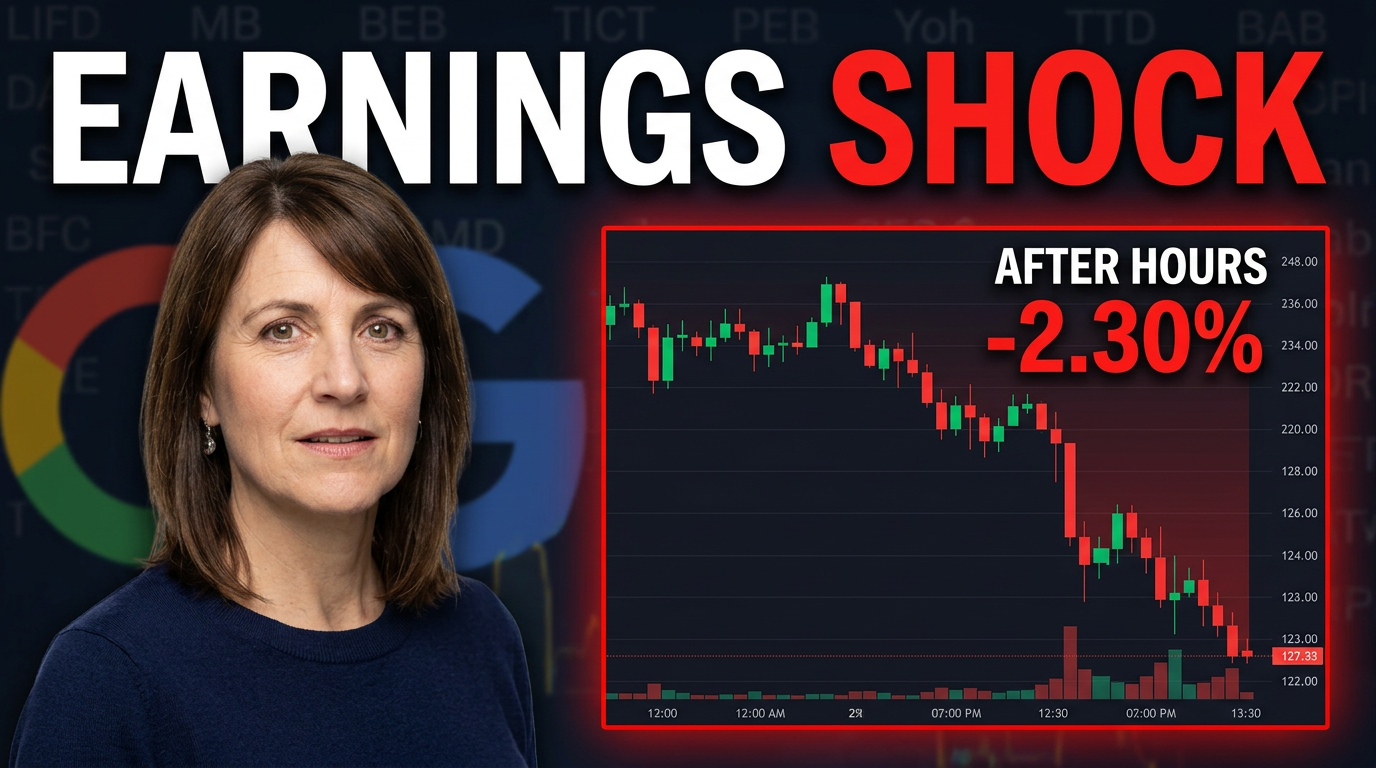
Finance thumbnail concept with a female creator reacting to a sharp post-earnings stock move

Earnings reaction video

Make the earnings move and the creator’s reaction instantly legible.

See the visual approach

Supplied female creator in the foreground with an alert, concerned reaction, angled toward a large red-and-green after-hours price chart. Subtle earnings-report document and recognizable company logo treatment in the background, with a sharp downward chart move receiving the strongest visual emphasis. Premium newsroom lighting, uncluttered financial-commentary composition. Use the supplied chart and brand materials as source material.

Make a thumbnail like this
Investing thumbnail concept with a male creator beside diversified ETF and long-term growth visuals

Long-term ETF investing lesson

Use a calmer, education-first visual for a long-term investing message.

See the visual approach

Supplied male creator seated at a desk in a clean home-office investing setup, calm confident expression, gesturing toward a simple diversified-fund visual and a smooth long-term upward growth line. Warm natural lighting, restrained blue and green palette, minimal background details, trustworthy educational mood, emphasis on patient investing rather than fast trading. Use any supplied fund or portfolio source visual subtly.

Make a thumbnail like this

These examples are starting points. Results vary based on your images, wording, and creative direction.

Thumbnail ideas for investing content

Create visuals that give viewers a fast read on the market event or investing question without turning the thumbnail into a crowded chart.

  • Stock analysis and price-target breakdowns
  • Earnings previews, reactions, and post-earnings analysis
  • Portfolio updates and watchlist videos
  • Market open, close, and weekly recap coverage
  • ETF, dividend, and long-term investing lessons
  • Options strategy explainers and trade recaps
  • Federal Reserve, inflation, jobs, and macro commentary
  • Beginner investing myths, mistakes, and concepts

A simple workflow you can reuse

  1. 1

    Upload the visuals your analysis depends on

    Add a headshot, candlestick chart, earnings graphic, company logo, portfolio screenshot, or market-news image. Use source material that viewers will recognize from the video.

  2. 2

    State the market angle clearly

    Tell Thumbnail.AI whether the focus is a breakout, selloff, earnings surprise, valuation question, portfolio decision, or macro event. Include the exact short wording you want visible.

  3. 3

    Set the visual hierarchy

    Ask for your face to carry the reaction, the ticker or chart to be easy to identify, and one key market signal to receive emphasis. Keep secondary details subtle.

Frequently asked questions

Answers for building a useful, repeatable thumbnail workflow—not just generating one image.

Browse all thumbnail makers
Can I use my own stock charts and screenshots?

Yes. Upload your chart screenshots, broker-platform captures, earnings tables, logos, or portfolio visuals as source material. For readability, use a crop that preserves the important level, trend line, or price move.

How much text should an investing thumbnail include?

Usually one short market idea works best: a ticker, a move, or a question. Keep the visible wording brief enough to read on mobile, then let the title provide the additional context.

Can I make a thumbnail for a portfolio update without displaying account balances?

Yes. Use a blurred or cropped portfolio screenshot, a holdings list without sensitive figures, a representative chart, or a branded watchlist visual. You can direct Thumbnail.AI to avoid showing balances, account numbers, or private information.

How should I handle bullish or bearish claims in a thumbnail?

Make the thumbnail match the analysis rather than imply certainty. Frame the visual around a setup, question, risk, or market move when appropriate, and reserve the supporting reasoning and disclosures for the video.

Can Thumbnail.AI keep a consistent finance-channel look?

Yes. Reuse your headshot, brand colors, preferred chart treatment, and layout direction across market recaps, stock reviews, and educational videos while changing the central asset and message for each upload.

Create your next investing thumbnail

Upload your face and market visuals, specify the video angle and exact wording, and shape a thumbnail that fits your analysis in Thumbnail.AI.

Create a thumbnail