
Real Estate Thumbnails That Put the Property—and You—Front and Center

Turn listing photos, headshots, neighborhood shots, and plain-language creative direction into custom YouTube-style thumbnails for tours, market updates, buyer advice, and local real estate content.

  • Your face
  • Your source images
  • Plain-language edits
Real estate agent in front of a luxury modern home thumbnail concept

Create custom real estate thumbnails without forcing every video into the same template

A strong real estate thumbnail should make the subject of the video immediately clear: a standout home, a recognizable neighborhood, a useful market question, or a buyer and seller decision. Thumbnail.AI helps you build around your actual assets. Upload a listing exterior, luxury interior, map, or personal headshot; specify the words viewers should see; then describe the layout you want. Revise details in plain language until the thumbnail feels consistent with your market, brokerage presence, and channel.

Built for agents creating property tours, listing launches, neighborhood spotlights, local market updates, relocation content, and practical buyer or seller advice.

Three thumbnail ideas for real estate agents

Each example explores a different visual direction and can be adapted with your own face, images, wording, and brand.

Real estate agent in front of a luxury modern home thumbnail concept

Luxury listing tour

Frame a premium property tour around the home’s most recognizable exterior feature.

See the visual approach

Use the supplied male agent headshot as a confident foreground cutout on the left. Place the supplied luxury property exterior prominently across the background, with warm late-afternoon light, clean architectural lines, and an upscale editorial mood. Leave clear high-contrast space on the right for headline placement. Emphasize the home’s scale and curb appeal.

Make a thumbnail like this
Female real estate agent with local city skyline for market update thumbnail concept

Local market update

Make a local market conversation feel direct, credible, and location-specific.

See the visual approach

Use the supplied female agent headshot in a polished, approachable foreground portrait on the right. Build a crisp background from the supplied local skyline or neighborhood image, with subtle chart-inspired shapes and restrained color accents. Create a confident news-style composition with open negative space on the left for headline placement. Emphasize local expertise and a timely, practical mood.

Make a thumbnail like this
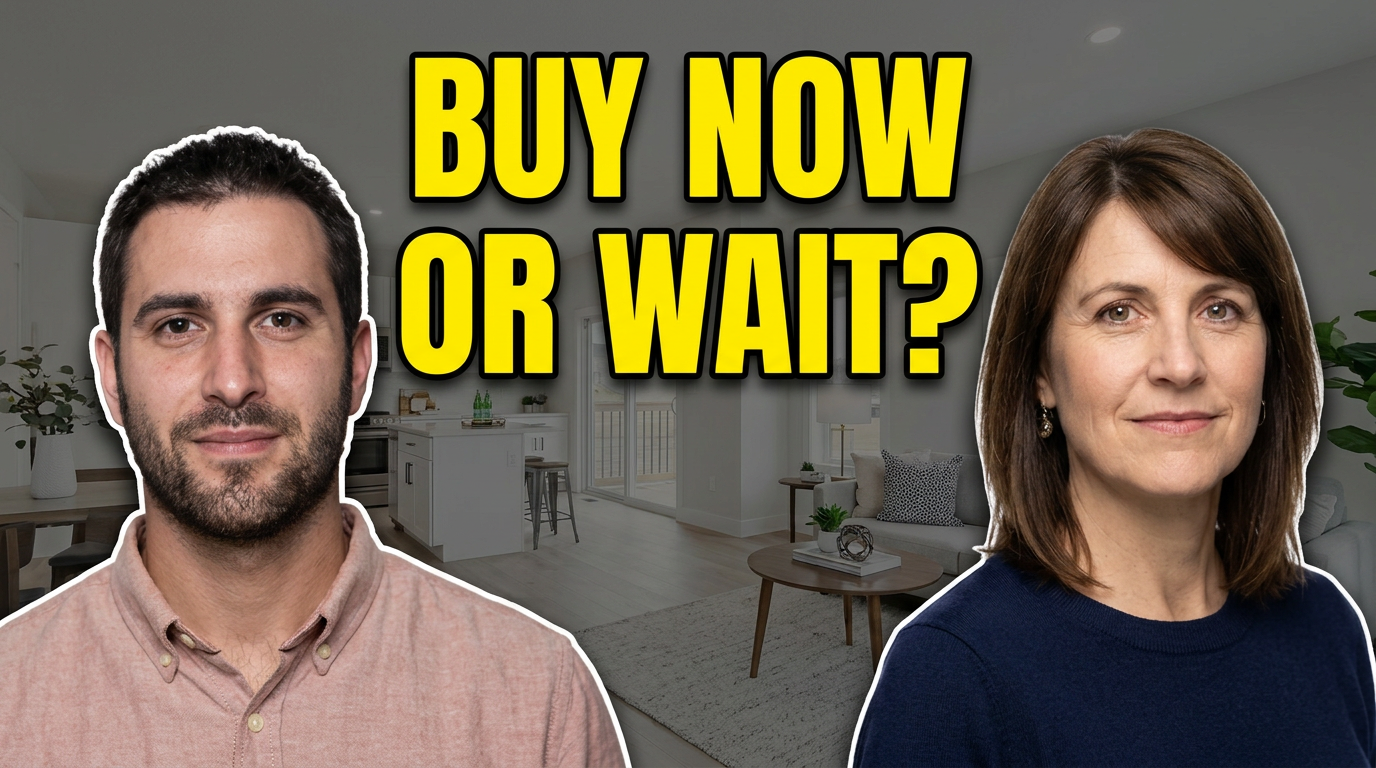
Two real estate professionals discussing a home buying decision thumbnail concept

Buyer versus seller conversation

Use a two-person composition for a balanced conversation about a major client decision.

See the visual approach

Place the supplied male and female real estate professional headshots facing each other in the foreground with engaged, thoughtful expressions. Use a bright contemporary home interior from the supplied source image as the background, lightly softened for separation. Create a balanced split composition with a subtle visual tension between the two sides and centered room for headline placement. Emphasize an informed, conversational decision-making mood.

Make a thumbnail like this

These examples are starting points. Results vary based on your images, wording, and creative direction.

Thumbnail ideas for real estate channels

Use a distinct visual angle for each content type so viewers can quickly tell a new listing from a market update or an educational video.

  • Luxury home tours that highlight a defining feature such as a waterfront view, modern kitchen, acreage, or skyline
  • New listing announcements built around the strongest exterior or hero room photo
  • Neighborhood spotlights that pair your face with a recognizable local street, landmark, or aerial view
  • Market updates using a confident on-camera portrait and clean, data-focused visual hierarchy
  • First-time buyer and seller videos that make the question or decision feel approachable
  • Relocation and cost-of-living content featuring the destination and an inviting local perspective
  • Open-house recaps, renovation reveals, and before-and-after property stories
  • Local real estate myth-busting videos where your expression supports a direct point of view

A simple workflow you can reuse

  1. 1

    Start with the video’s clearest hook

    Choose one focal point: the home, the location, the price conversation, or the question your audience wants answered. Avoid trying to show every room or every statistic at once.

  2. 2

    Add your real assets

    Upload your headshot, listing photography, property renderings, neighborhood imagery, or source photos. Using recognizable visuals helps each thumbnail match the content viewers will find in the video.

  3. 3

    Set the visible wording

    Keep thumbnail text short and decisive. A few words can frame a property tour, location comparison, or market takeaway without duplicating the full video title.

Frequently asked questions

Answers for building a useful, repeatable thumbnail workflow—not just generating one image.

Browse all thumbnail makers
What should a real estate agent include in a YouTube thumbnail?

Start with one high-impact property or location image, then add a clear on-camera photo when personal recognition matters. Use a short phrase that clarifies the video angle, such as a price discussion, neighborhood comparison, or defining home feature. Keep the layout readable at phone size.

Should I use listing photos in my thumbnails?

Yes, when the video is about that listing or a specific property feature. Use the strongest approved image—often the exterior, kitchen, view, pool, or main living space—and make sure you have the right to use the photography in promotional video artwork.

Can I create thumbnails for market updates without using a house photo?

Yes. Market updates often work best with a professional portrait, a local visual such as a skyline or neighborhood street, and a simple data-inspired composition. This makes the video feel local without implying that it is about a particular listing.

How much text should a real estate thumbnail have?

Usually two to six words is enough. The thumbnail should communicate the angle at a glance, while the video title can provide the fuller context, location, and details.

Can I keep a consistent look across listing tours and advice videos?

Yes. Reuse your preferred portrait treatment, colors, and general type hierarchy while changing the primary image and mood for each format. This keeps your channel recognizable without making every upload look identical.

Make the next property video easy to recognize

Bring your own face, listing images, and local visual assets to Thumbnail.AI, then direct the design with the exact words and look you want.

Create a thumbnail in Thumbnail.AI